

How Astry helps a major construction company manage crises on its job sites
Astry was designed to reach the right person at the right time, whether a server goes down or an accident happens on a construction site. A workplace accident, an evacuation, a safety incident involving a worker: these are exactly the same problem to solve as an IT outage: get the information out fast, to the right person, with a clear procedure for what needs to happen.
This is a use case Astry was built for from the start, and one that a major construction company runs in the United States: Astry serves as the crisis management tool on physical job sites, for everything related to on-site team safety (in the broad sense). This article walks through, feature by feature, what Astry's Crisis module offers, using this deployment as a throughline.
The problem: a crisis isn't always an IT problem
Most crisis management tools on the market are built around IT: they start from a monitoring alert, route it to a technical team, and stop there. Managing a workplace injury on a construction site follows a similar pattern: someone notices a problem, needs to notify the right people immediately, follow a known procedure, and leave a record of what was done.
That's also what drove this customer's choice. Today, IT on-call and safety procedures can be managed in the same place, with the same traceability.
One organization per job site, teams by scope
At this company, each job site is its own Astry Organization. Within each job site, the organization is split into several Teams, based on each group's responsibilities and the scope they work on. Teams can be linked to a Resource of category "Location", pinned by its GPS coordinates on a map (a natural fit for representing a physical job site, as distinct from a plant or an office).
When a crisis is declared, it's assigned to the relevant team within the job site's organization. All the resolution mechanics unfold within that team's scope, while communication around the crisis can reach more broadly (for example, to people outside the team).
Positions, not just roles
Astry has long distinguished three technical roles (Owner, Responder, Stakeholder), which govern access rights to the tool. But a technical role says nothing about a job site's actual chain of command.
That's what Positions are for: business titles defined by the organization (site manager, HSE officer, works supervisor, ...) and assigned to team members independently of their Astry access rights. The same person can be "Team Lead" in one team and "Manager" in another.
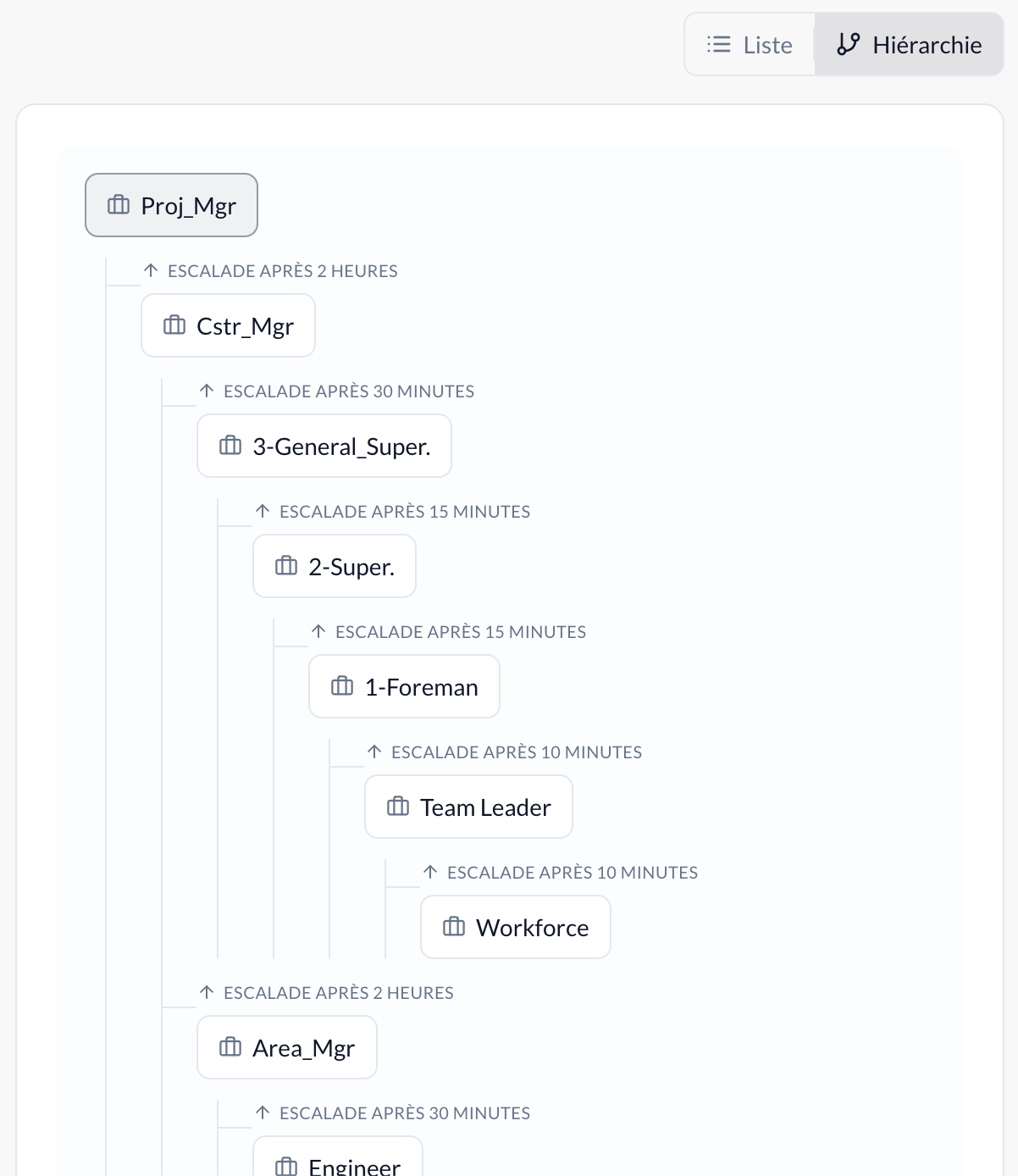 Example of defining a position hierarchy.
Each position can carry its own escalation: if an action assigned to a position isn't handled within a defined delay (from 5 minutes to 7 days), it automatically reassigns to another position. On a job site, this means an alert not handled by the site manager can automatically escalate to the regional HSE officer, with no manual intervention required.
Declaring a crisis in a few screens, from the field
On site, nobody wants to fill out a ten-field form to report a problem. Declaration happens from the mobile app, in five screens deliberately reduced to the essentials: Location, Team, Type, Subtype, then Description.
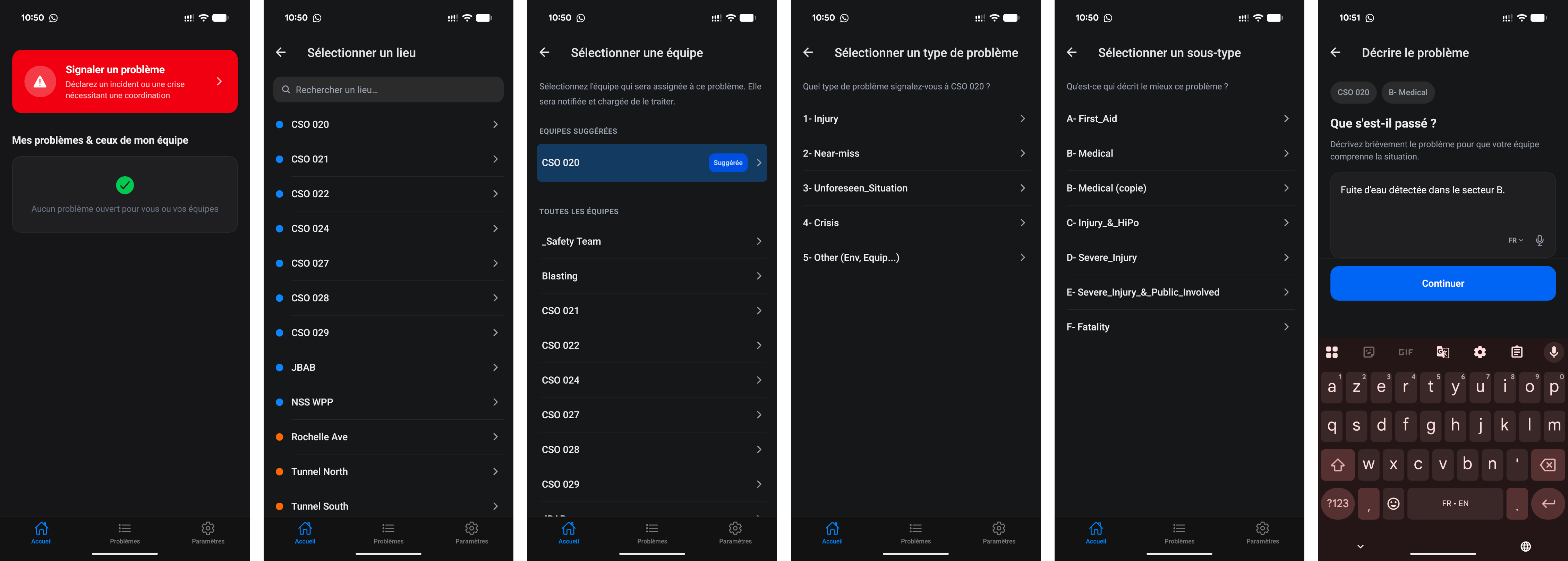 Preview of the mobile declaration flow
One detail makes a real difference on a construction site: the description can be dictated instead of typed, the corresponding field is filled in automatically from the voice recording made at the time of declaration (useful when you're wearing a site headset with your hands full). The timestamp, for its part, is filled in automatically, with no action needed from the user.
The fields shown and the actions to complete are configured beforehand (see the next section).
Configure once: Crisis Types and Templates
This is the core of the system, and what lets a 30-second declaration trigger a full process behind the scenes.
A Crisis Template defines in advance:
- a status message and a closure message, with dynamic fields (text or date) that the person on site only has to fill in;
- a list of contacts and teams to notify automatically (email, SMS, voice call, push notification, Microsoft Teams);
- a checklist of actions to complete, sequentially or in parallel.
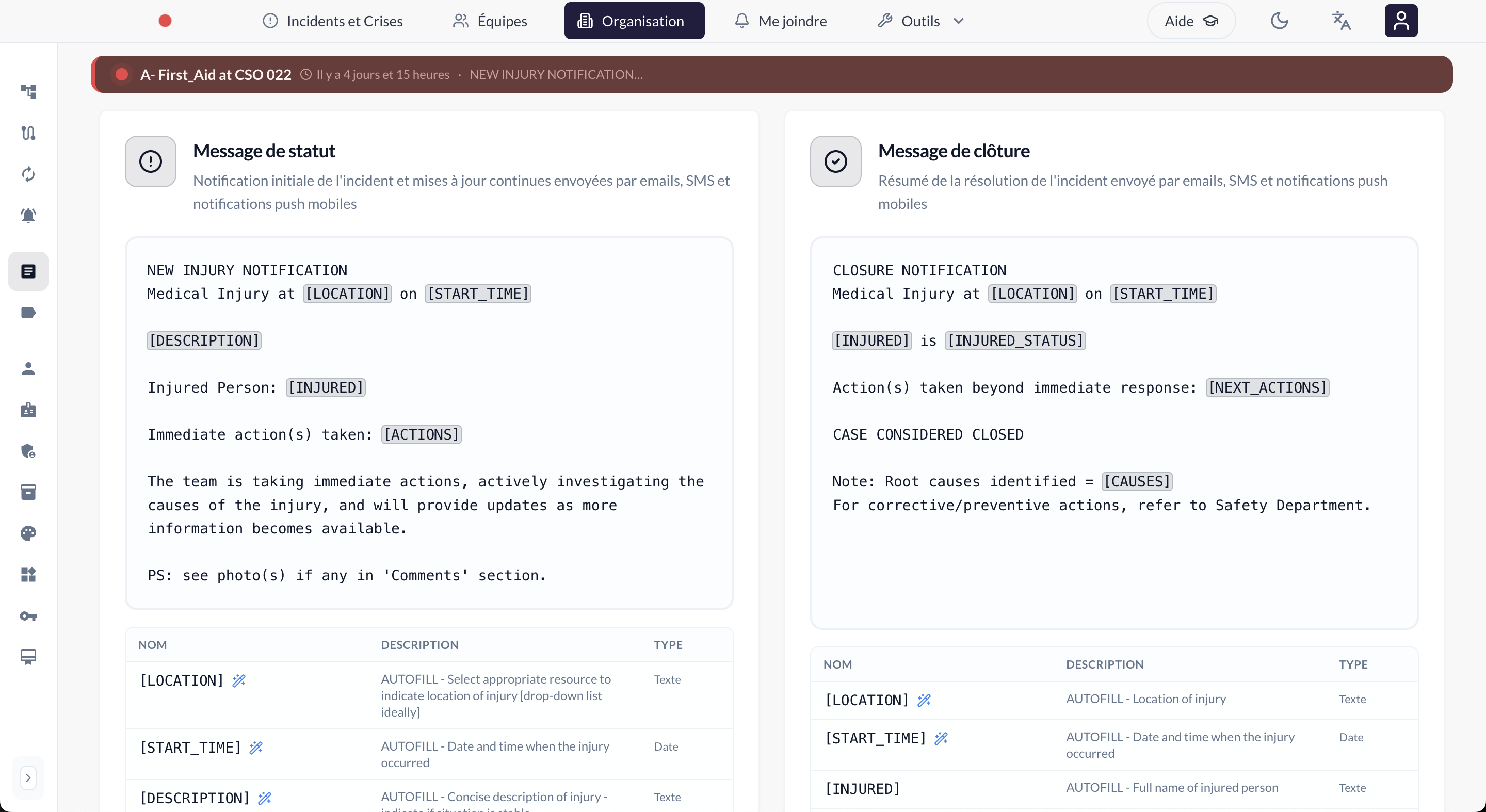 Example of configuring status and closure messages on a crisis template.
Crisis Types (Workplace injury, Security incident, Evacuation, ...) are simple labels used to filter and find the right Template when declaring a crisis (the person on site doesn't have to guess which procedure to follow, they pick the right type and the right template appears).
For this customer, this means turning an internal workplace-accident procedure (usually a PDF document nobody re-reads under stress) into a reusable Template, tested in advance, and applied the same way every time, on every site.
Actions: turning an internal procedure into an operational checklist
Every step of the customer's procedure becomes an Action in the Crisis Template: a label, a description, required or not, assigned to a Position rather than a named person (whoever holds that position, within the relevant team on the job site, gets notified). Required actions must be completed before the crisis can be closed.
These actions can run sequentially ("after the previous one") or in parallel, to faithfully represent a real-world process: notifying safety and calling emergency services at the same time, but only informing regional management once the situation is stabilized, for example. Each action can also carry its own notification method and its own reminder frequency, independent of the general message sent to all of the crisis's contacts.
Astry doesn't integrate these actions with an external system: they remain internal steps, checked off and logged in the tool. So there's no integration to build before you can start using these actions.
A mixed US/ES team, a single template
This customer's site teams don't all speak the same language: part of the workforce speaks English, another part Spanish. Automatic translation kicks in at two points.
On the configuration side, each action in a Crisis Template can carry an automatically proposed translation (source language detection, then translation into English, Spanish, or French), always editable before being confirmed (never applied silently). Whoever builds the Template writes each action once; the person consulting it on site sees it in their own language.
On the declaration side, when a worker reports a crisis by voice from the mobile app, their spoken description is automatically translated into English (the original wording is always kept alongside the translation). The worker can therefore speak in their own language. At headquarters, the crisis is followed in English, while the original wording is preserved.
It's a small detail, but it's exactly the kind of friction that, in normal circumstances, causes a well-written procedure to stop being followed to the letter by part of the team (or causes a critical piece of information to get lost in an improvised phone-call translation).
Monitoring every crisis on a job site
With several teams active on the same job site, you also need a bird's-eye view. Astry displays a persistent crisis banner across the whole app as soon as a crisis is open anywhere in the organization. The dashboard also surfaces open crises alongside technical incidents, for a single view of the situation on the job site.
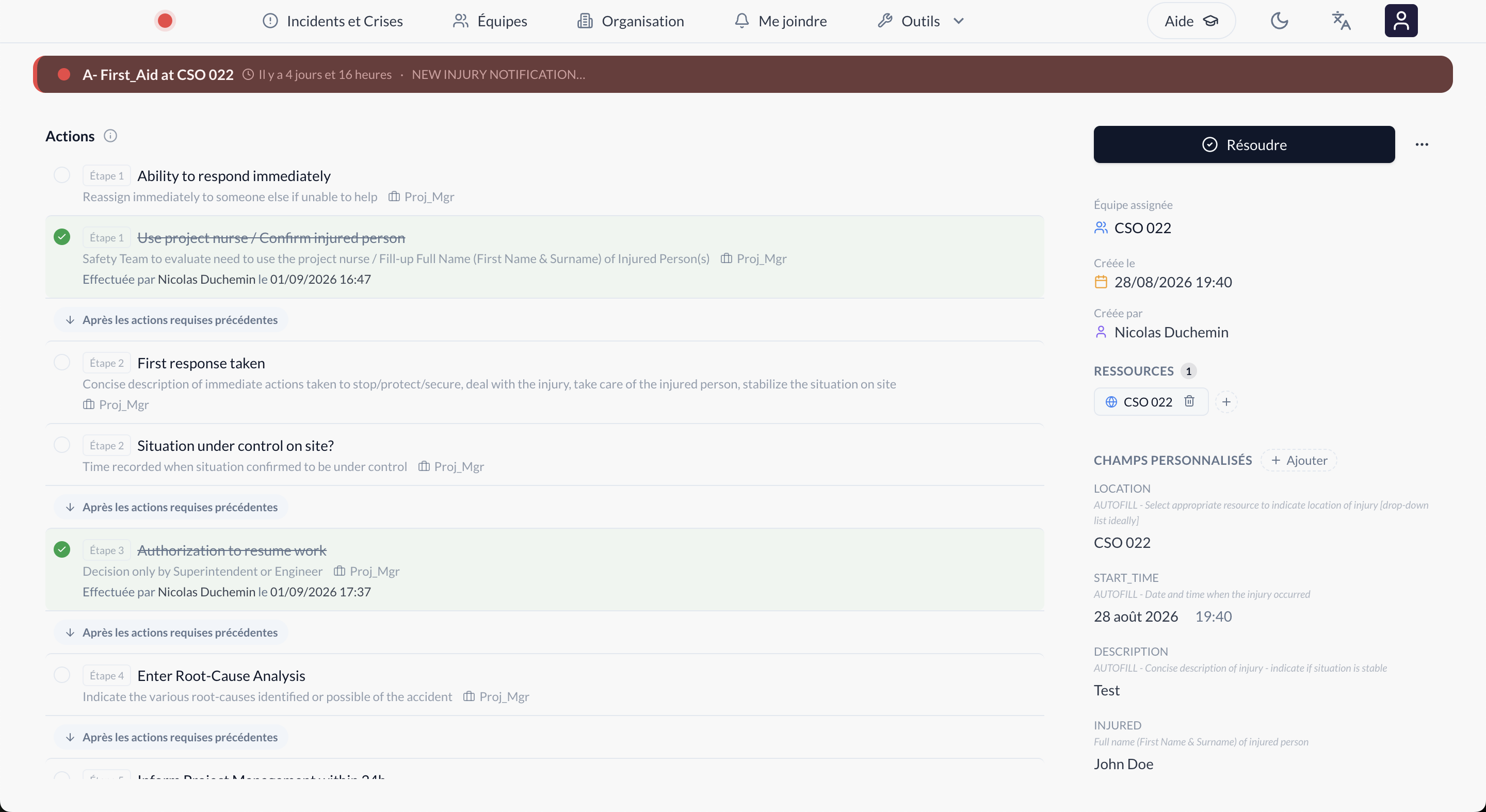 The crisis object, its contacts, actions, and events are tracked and visible on the crisis follow-up page.
The dedicated crisis reporting module then lets you step back: number of crises declared, average and median resolution time, longest-running crises (all useful indicators for spotting a site or an incident type that might need a revised procedure).
After the crisis: the report
Once a crisis is resolved, Astry generates a Crisis Report exportable as a PDF: description, status and closure messages, notified contacts, full timeline of events (status changes, escalations, completed actions), pending actions, and photos shared as comments during the crisis.
For an industry like construction, where documenting a workplace accident carries as much legal weight as operational value, having this document generated automatically (rather than reconstructed after the fact from emails and scattered notes) is a direct time saver for HSE teams.
One platform, every field
This deployment illustrates what Astry was built for: both an IT on-call tool and a generic crisis management engine (teams, positions, templates, actions, escalation, traceability) that every organization configures for its own domain. Whether that domain is a server room or a construction site changes nothing about the mechanics.
If your organization manages exceptional situations beyond the IT perimeter (physical safety, environment, business continuity) contact us to talk about your use case, or get started for free to configure your first Crisis Template.
Keywords: crisis, site safety, construction, escalation, automatic translation, incident report.